Encoders & Streaming
Connect your station to the world with multiple simultaneous stream outputs.
Encoder Overview
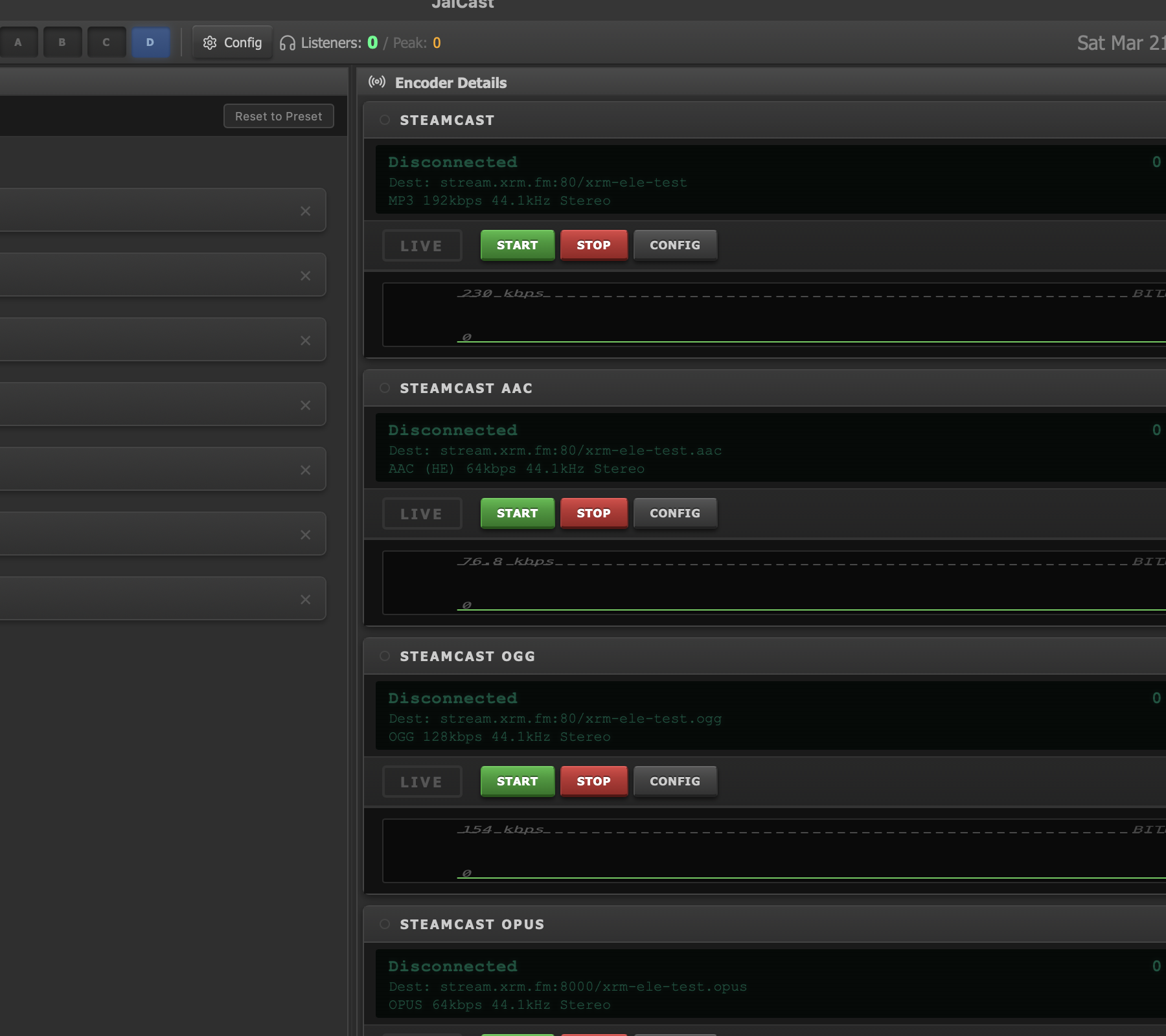
Encoder detail cards showing connection status, codec, and bitrate.
Encoders are the bridge between JaiCast and your listeners. Each encoder takes your mixed audio output, compresses it with a chosen codec, and sends it to a streaming server or writes it to a file on disk.
- Multiple simultaneous encoders — run as many as you need, each with its own codec, bitrate, and destination.
- Independent operation — each encoder connects, encodes, and reconnects on its own. Starting or stopping one has no effect on the others.
- Encoders panel — a compact status view on the right side of the main window shows connection state and basic stats for every configured encoder.
- Encoders tab — a detailed view with full configuration, bitrate history graphs, and per-encoder controls.
Supported Protocols
JaiCast can send audio to a variety of streaming server types. Choose the protocol that matches your infrastructure.
| Protocol | Codecs | Notes |
|---|---|---|
| SHOUTcast v1 | MP3 | Legacy SHOUTcast protocol. Widely supported by older servers and directories. |
| SHOUTcast v2 | MP3, AAC | Updated SHOUTcast protocol with AAC support and improved metadata handling. |
| Icecast 2 | OGG/Vorbis, Opus, FLAC, MP3 | Open-source streaming server. Supports mount points for multiple streams on one server. |
| HLS | AAC (LC, HE-AAC), MP3 | HTTP Live Streaming. Generates segmented playlists for adaptive playback in web browsers and mobile apps. |
| DASH | AAC, MP3 | Dynamic Adaptive Streaming over HTTP. Similar to HLS but uses the MPEG-DASH standard. |
| RTMP | AAC, MP3 | For streaming to platforms like YouTube Live, Twitch, or any RTMP ingest server. |
| SRT | AAC, MP3, Opus | Secure Reliable Transport. Low-latency streaming with AES encryption support. Designed for contribution links and high-quality feeds over unpredictable networks. Alpha feature, available via the API. |
Supported Codecs
The codec determines how your audio is compressed before transmission. Lossy codecs reduce file size at the cost of some quality; lossless codecs preserve the original audio exactly.
Lossy Codecs
| Codec | Encoder | Typical Bitrates | Notes |
|---|---|---|---|
| MP3 | libmp3lame | 64 – 320 kbps | Universal compatibility. 128 kbps is a common choice for internet radio. |
| AAC-LC | Platform-dependent | 64 – 256 kbps | Better quality than MP3 at the same bitrate. Low Complexity profile. |
| HE-AAC | Platform-dependent | 32 – 80 kbps | High Efficiency AAC. Excellent quality at low bitrates using Spectral Band Replication. |
| HE-AACv2 | Platform-dependent | 24 – 48 kbps | Adds Parametric Stereo to HE-AAC. Best for very low bitrate stereo streams. |
| OGG Vorbis | libvorbis | 64 – 320 kbps | Open-source, patent-free. Used primarily with Icecast servers. |
| Opus | libopus | 32 – 256 kbps | Modern codec with excellent quality across all bitrates. Requires Icecast 2.4+. |
Lossless Codecs
| Codec | Use Case |
|---|---|
| FLAC | Lossless streaming over Icecast, or lossless file recording. Compressed but bit-perfect. |
| WAV | Uncompressed lossless recording to disk. Large file sizes but zero encoding overhead. |
aac_at), while Linux uses libfdk_aac. Both produce high-quality output, but available profiles may differ slightly.
Adding an Encoder
To create a new encoder and connect to a streaming server:
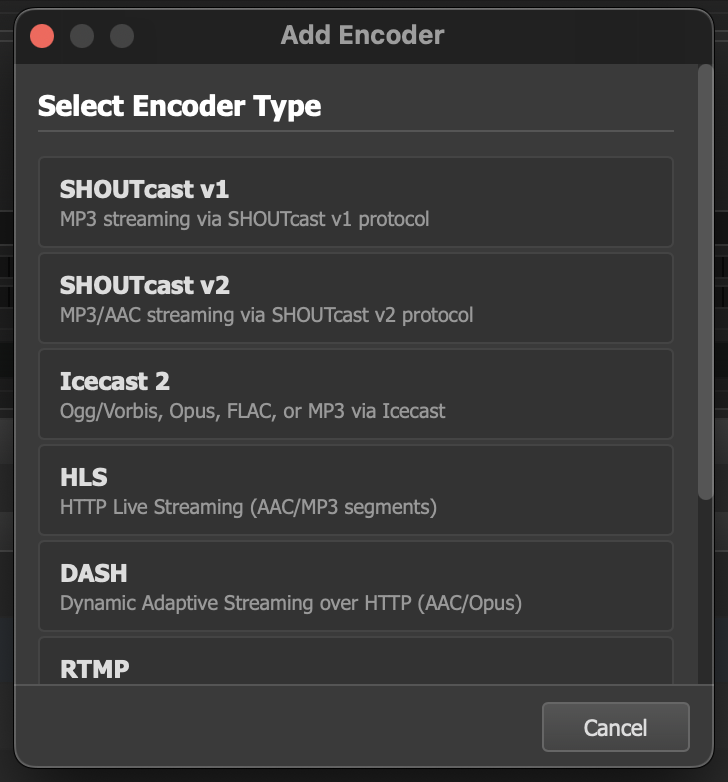
The encoder type picker dialog where you select the streaming protocol for a new encoder.
- Click the + button in the Encoders panel on the right side of the main window.
- In the encoder type picker dialog, select the protocol you want to use (Icecast, SHOUTcast, HLS, DASH, RTMP, or File Recording).
- Configure the encoder settings:
- Name — a label to identify this encoder in the panel (e.g., "Main MP3 Stream").
- Codec — the audio codec to use for encoding.
- Bitrate — target bitrate in kbps. Higher values mean better quality but more bandwidth.
- Host — the address of your streaming server.
- Port — the server port (typically 8000 for Icecast, 8080 for SHOUTcast).
- Mount point — the stream path on the server (Icecast only, e.g.,
/live). - Username — source username (usually
sourcefor Icecast). - Password — the source password from your server configuration.
- Optional settings:
- Auto-start on launch — automatically connect this encoder when JaiCast starts.
- Public directory (YP) — list your stream in the server's public directory so listeners can discover it.
- UTF-8 metadata — send track metadata in UTF-8 encoding. Enable this unless you have a specific reason not to.
- Click Save to create the encoder, then click Start to connect.
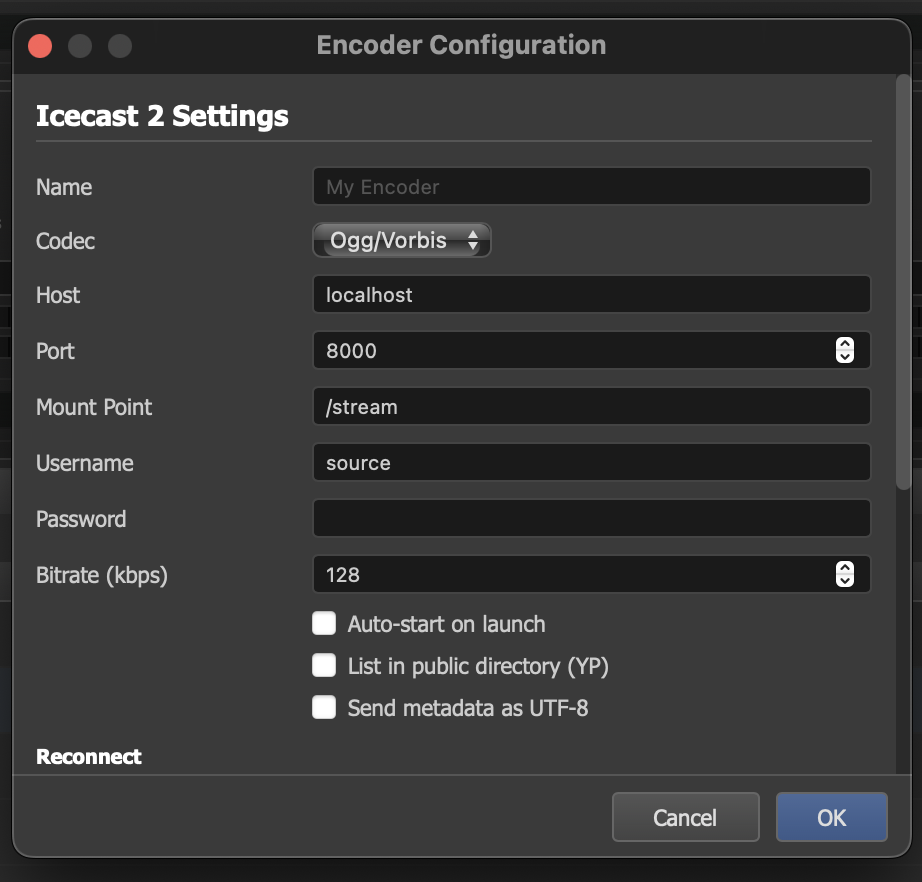
Icecast 2 encoder configuration with host, port, mount point, codec, and bitrate settings.
Encoder Detail View
Each encoder has a detail view accessible from the Encoders tab. This view provides real-time information and controls for the encoder.
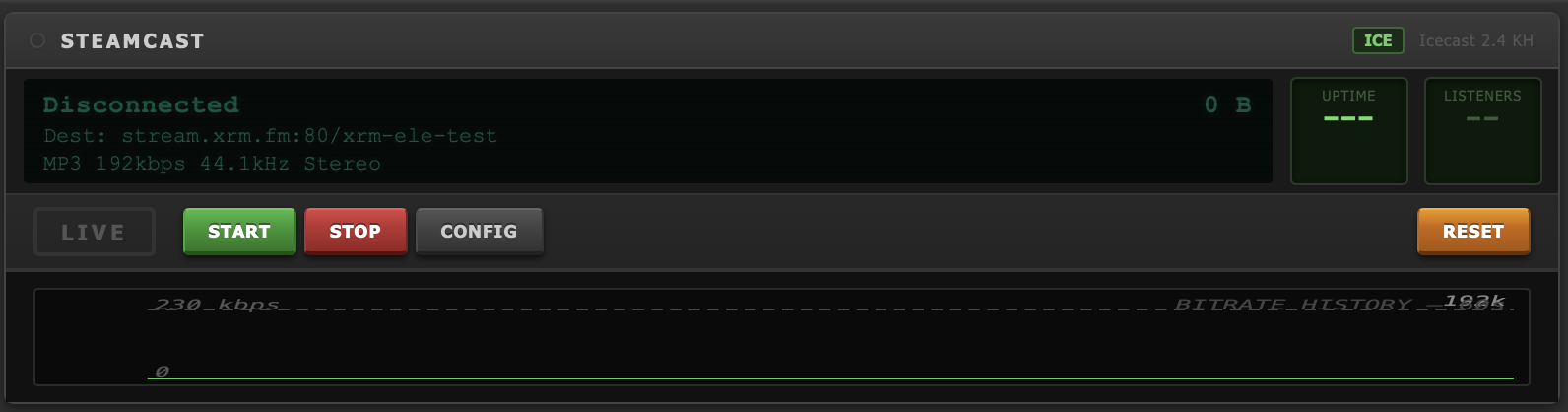
Encoder detail view showing connection status, live indicator, data sent, and bitrate history graph.
Status Indicators
- Connection status — shows whether the encoder is Connected or Disconnected, with a color-coded indicator.
- LIVE indicator — a prominent badge that appears when the encoder is actively streaming.
- Destination URL — the full URL where audio is being sent, including protocol, host, port, and mount point.
- Codec info — displays the active codec and bitrate configuration.
Statistics
- Data sent — total amount of data transmitted since the encoder was started.
- Uptime — how long the encoder has been connected to the server.
- Listener count — the number of listeners currently tuned in (when reported by the server).
- Bitrate history graph — a visual chart showing the actual bitrate over time, useful for spotting network issues or encoder stalls.
Controls
| Button | Action |
|---|---|
| Start | Connect to the streaming server and begin encoding. |
| Stop | Disconnect from the server and stop encoding. |
| Config | Open the encoder configuration dialog to modify settings. |
| Reset | Reset the encoder's statistics counters (data sent, uptime). |
Recording
In addition to live streaming, JaiCast can record your broadcast output to files on disk. The recording encoder works just like a streaming encoder but writes to a local directory instead of sending data to a server.
Configuration
- Output directory — choose where recorded files are saved.
- Codec — all codecs are available for recording, including lossless options (FLAC, WAV) for archival-quality captures.
- Split mode:
- Per-track split — creates a new file each time a new track begins playing. File names are derived from the track metadata.
- Continuous — records the entire session into a single file. Useful for capturing a complete show or broadcast block.
Auto-Reconnect
Network interruptions happen. JaiCast includes configurable auto-reconnect behavior so your stream recovers without manual intervention.
Settings
| Setting | Description |
|---|---|
| Initial delay | How long to wait after a disconnect before the first reconnect attempt (in seconds). |
| Max delay | The maximum wait time between reconnect attempts. The delay increases with each failed attempt up to this ceiling. |
| Stall threshold | If the encoder detects that no data has been sent for this duration, it treats the connection as stalled and triggers a reconnect. |
Metadata Updates
When connected to a streaming server, JaiCast automatically sends metadata updates as tracks change. This includes the track title, artist, and any other configured metadata fields. Listeners see this information in their media player as the "now playing" display.