Settings: Cross Fading
Transition curves, timing, and trigger behavior for seamless handoffs between tracks.
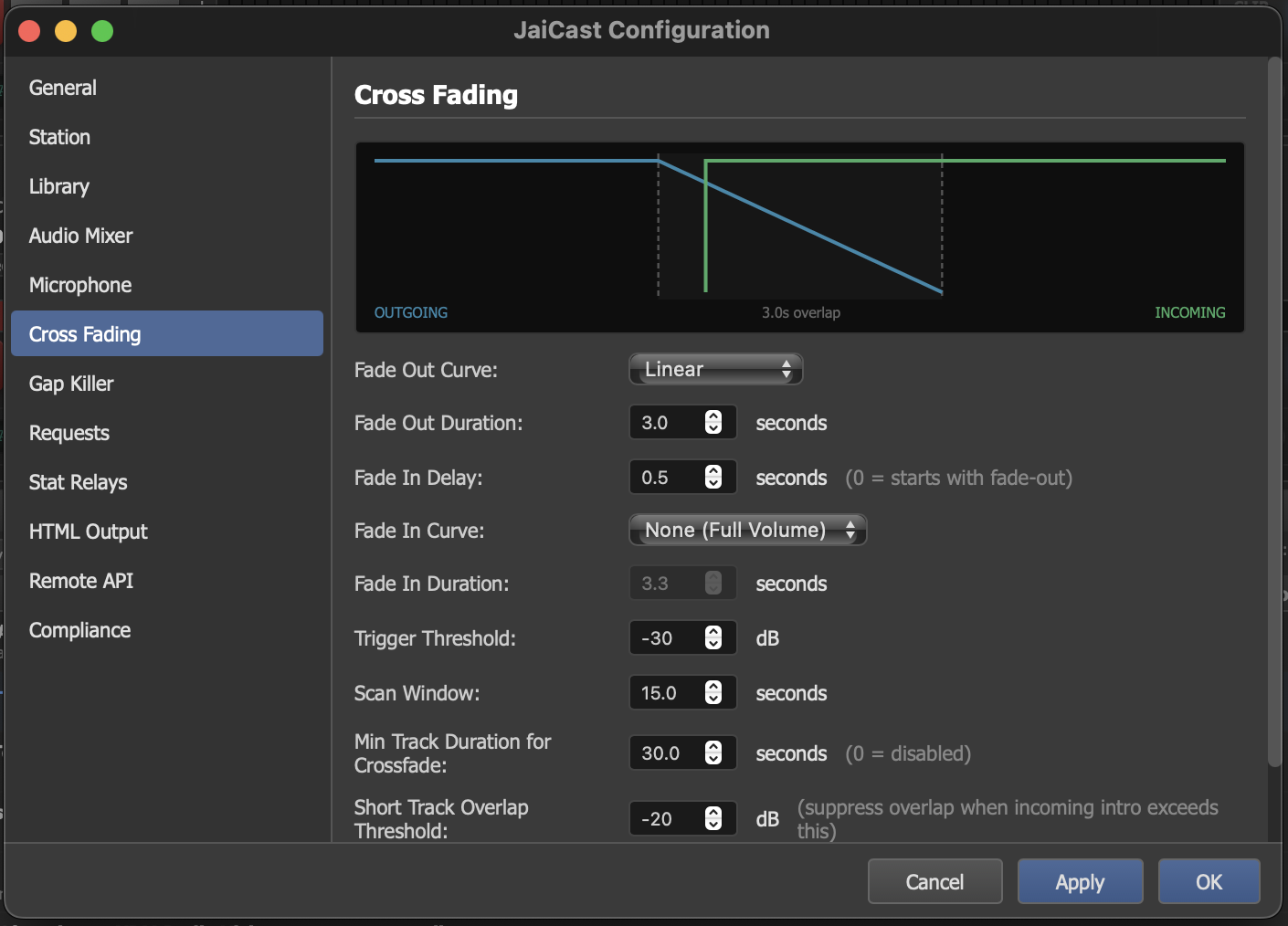
The Cross Fading settings panel with curve, timing, and trigger configuration.
How Crossfading Works
Crossfading is the process of smoothly transitioning from one track to the next by overlapping the end of the outgoing track with the beginning of the incoming track. The outgoing track fades down while the incoming track fades up, creating a seamless blend.
JaiCast's crossfade engine is fully configurable, giving you control over the shape, timing, and trigger behavior of every transition. The settings on this page define the default crossfade profile used by AutoDJ. Manual crossfades initiated by the DJ use the same parameters.
Crossfade Curve
The crossfade consists of two independent curves that work together:
- Fade Out — the volume envelope applied to the outgoing (ending) track as it transitions to silence.
- Fade In — the volume envelope applied to the incoming (starting) track as it ramps up from silence to full volume.
The fade-in can be delayed relative to the fade-out, allowing you to control how much the two tracks overlap. A shorter delay means more overlap (both tracks playing at the same time); a longer delay creates a tighter transition with less simultaneous audio.
Fade Out
| Setting | Description |
|---|---|
| Fade Out Curve | The shape of the volume envelope as the outgoing track fades to silence.
|
| Fade Out Duration | The length of the fade-out in seconds. Longer durations produce gentler fades; shorter durations are more abrupt. |
Fade In
| Setting | Description |
|---|---|
| Fade In Delay | How long to wait after the fade-out begins before starting the fade-in of the next track. A delay of 0 means both fades start simultaneously (maximum overlap). A delay equal to the fade-out duration means the next track begins only after the previous one has fully faded out (no overlap). |
| Fade In Duration | The length of the fade-in in seconds. This controls how quickly the incoming track reaches full volume. |
| Fade In Curve | The shape of the volume envelope for the incoming track. Same curve options as Fade Out (Linear, S-Curve, Equal Power, Custom), plus None (Full Volume) which starts the incoming track at full volume with no ramp-up. |
Trigger Settings
| Setting | Description |
|---|---|
| Trigger Threshold | The audio level (in dB) below which the outgoing track is considered to be in its "tail." When the signal drops below this threshold, the crossfade engine begins the transition to the next track. Lower values (e.g., -40 dB) wait for near-silence before triggering. Higher values (e.g., -20 dB) trigger earlier while the track still has audible content. |
| Scan Window | How far from the end of the track (in seconds) the crossfade engine looks for the trigger threshold. A longer scan window gives the engine more time to find a natural transition point. If no point below the threshold is found within the window, the crossfade triggers at the default segue point. |
Mix Behavior
| Setting | Description |
|---|---|
| Min Track Duration for Crossfade | The minimum track length (in seconds) required for a crossfade to engage. Tracks shorter than this value play to completion without triggering a crossfade, preventing the transition from consuming most of the track's audio. Default: 30 seconds. |
| Short Track Overlap Threshold | The audio level (in dB) at which a short track's ending is considered quiet enough to begin the overlap with the next track. For very short clips like jingles and IDs, the crossfade engine uses this dB threshold instead of the standard trigger to determine when to start the transition, ensuring short elements play cleanly without being cut short. |