Settings: Library
Import rules, artwork fetching, genre lookup, and audio analysis configuration.
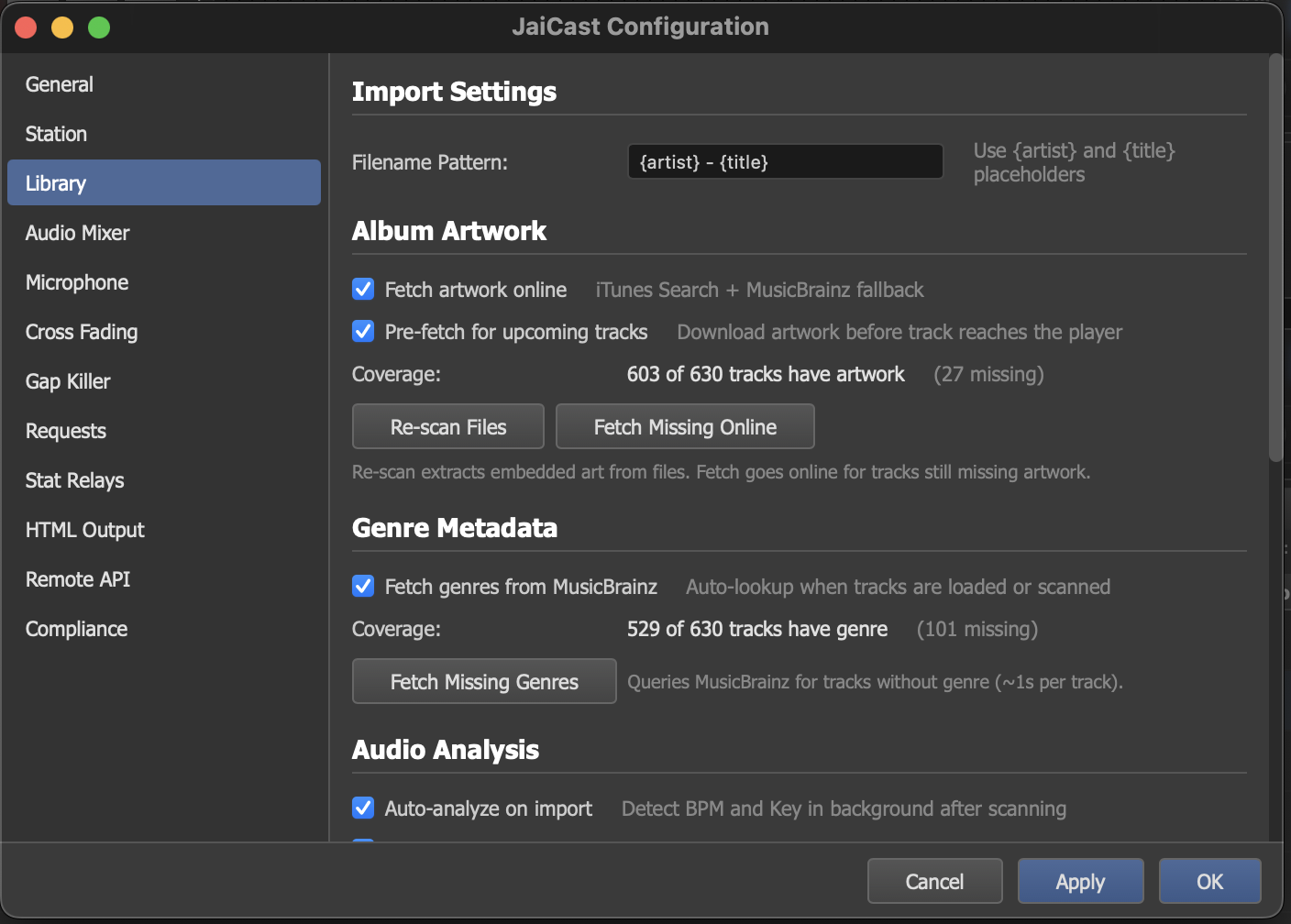
The Library settings panel with import rules, artwork fetching, and analysis options.
Import Settings
Filename Pattern
When importing audio files that lack embedded metadata tags, JaiCast can extract the artist and title from the filename using a configurable pattern.
The default pattern is:
{artist} - {title}This expects filenames like Daft Punk - Around The World.mp3. The text before the separator is treated as the artist, and the text after becomes the title.
You can customize the pattern to match your file naming convention. Available tokens:
{artist}— the track artist.{title}— the track title.
Album Artwork
JaiCast can automatically fetch album artwork from online sources to display in the library, deck displays, and stream metadata. Artwork is searched on iTunes and MusicBrainz and cached locally.
| Option | Description |
|---|---|
| Fetch Online | Enable automatic artwork lookup from iTunes and MusicBrainz when a track is added to the library. |
| Pre-fetch for Upcoming | Proactively download artwork for tracks that are scheduled to play soon, so artwork is ready before the track loads onto a deck. |
| Re-scan Files | Re-read embedded artwork from all audio files in the library. Useful after bulk-editing tags with an external tool. |
| Fetch Missing | Run a one-time pass over the entire library, attempting to find artwork for any tracks that currently have none. Progress and results are shown in the status bar. |
A coverage indicator shows the percentage of your library that has artwork. The goal is 100%, but some obscure tracks may not have artwork available in any online source.
Genre Metadata
JaiCast can look up genre information from MusicBrainz to fill in missing genre tags in your library. This is useful for tracks that were imported without genre metadata, or for standardizing genre names across your collection.
| Option | Description |
|---|---|
| MusicBrainz Genre Lookup | Enable automatic genre lookup when new tracks are added to the library. |
| Fetch Missing Genres | Run a one-time pass over the library to look up genres for any tracks that currently have no genre assigned. |
A coverage indicator shows the percentage of your library with genre data, similar to the artwork coverage display.
Audio Analysis
| Option | Description |
|---|---|
| Auto-Analyze on Import | Automatically run audio analysis on every track as it is imported into the library. Analysis detects BPM, musical key, and other audio characteristics used for harmonic mixing and sound code assignment. |
Audio analysis runs in a background queue and does not block the import process. Tracks are analyzed one at a time in order of import. You can monitor the analysis queue progress in the status bar.